
How do I add a new user for Multicraft?
To add a new user to your Multicraft account, you firstly must have the person sign up to the multicraft panel. Click here.
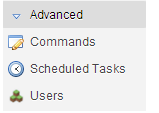
You then get the Owner account, and go to 'Servers' click on the server you want the person to have access to and go to the dropdown 'Advanced' and click on 'Users'.
Find the Person's name, and give the person either 'FTP Access' which is File Transfer Protocol, downloading and also uploading files, or administrator or moderator access to the server giving the person access to start, stop and do other things to the server!
You will see something like this show up on your page.
Give them access, and the page immediately gives the access.

Esta resposta foi útil?
Leia também
Powered by WHMCompleteSolution